> ## Documentation Index
> Fetch the complete documentation index at: https://docs.jupico.com/llms.txt
> Use this file to discover all available pages before exploring further.
# Timeout Handling
> How to handle network timeouts, lost responses, and rollbacks safely without double-charging customers.
Timeouts are a normal part of network payment processing. Jupico enforces a **35-second** limit on transaction and tokenization operations. Design your integration to handle timeouts safely — a request that times out from your side may still have been processed by Jupico.
## Timeout limits
| Operation type | Timeout |
| ----------------------- | ---------- |
| Transaction operations | 35 seconds |
| Tokenization operations | 35 seconds |
Set your HTTP client timeout to at least 35 seconds so you observe Jupico's own timeout rather than terminating early.
## Why timeouts matter
When a request times out, one of the following can be true:
1. Jupico never received the request.
2. Jupico received the request but the response was lost in transit.
3. Jupico is still processing it.
Do not retry blindly. Follow the recommended flow for each operation type.
## Transaction timeouts
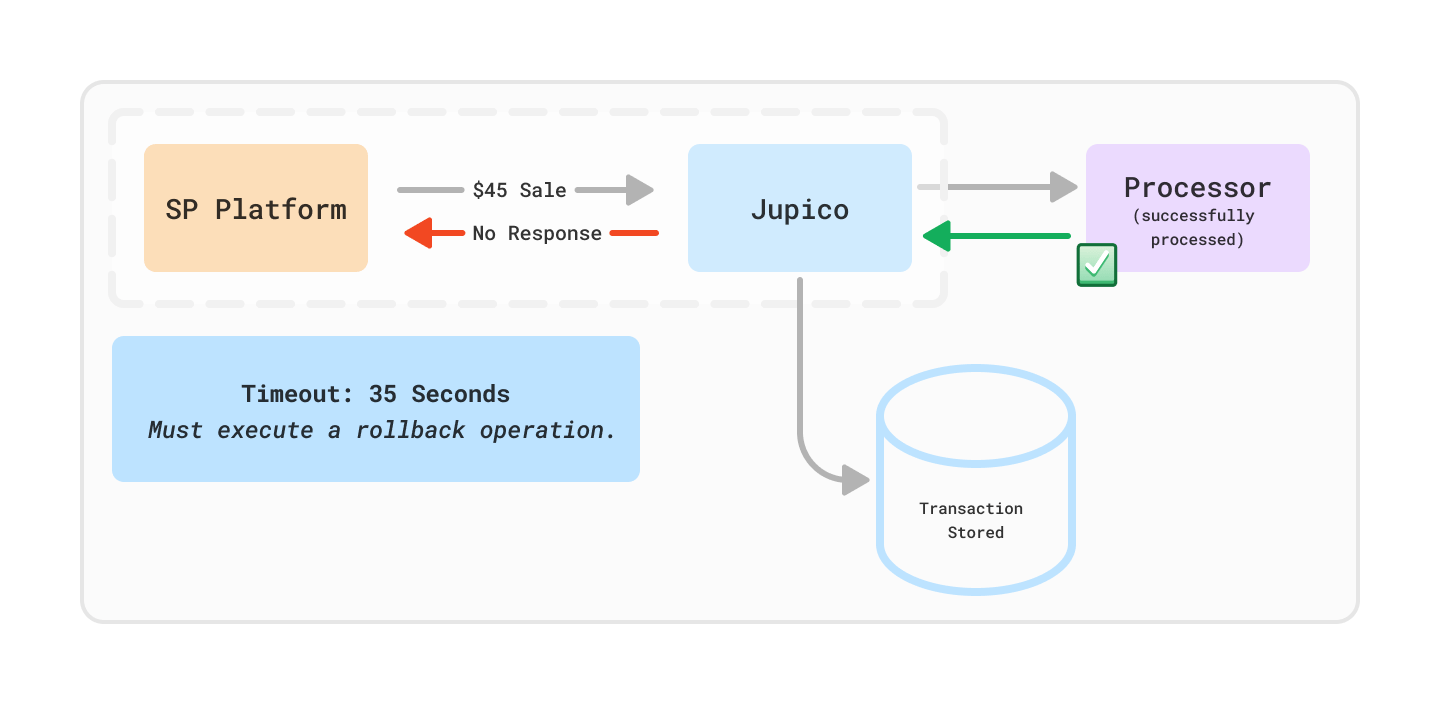 If a transaction operation times out, use the matching rollback operation to bring the transaction to a known state.
A retry may result in a duplicate payment.
Call the rollback operation for the original transaction. See the credit card and eCheck rollback endpoints in the API reference.
If the rollback succeeds, treat the original operation as reversed. If the rollback indicates no matching transaction, the original never occurred and can be safely retried.
Log the original request, `X-Request-ID` (if received), and rollback response.
Contact Jupico support if the final state cannot be determined.
Do not treat a transaction timeout as a decline. The transaction may still have succeeded.
## Tokenization timeouts
Tokenization operations do not move money, so it is safe to retry with backoff.
Apply an initial backoff before retrying.
Send the same request. {/* TODO: confirm whether Jupico expects a fresh idempotent key or the same payload on tokenization retry. */}
Use exponential backoff (for example, 1s, 2s, 4s, 8s) with jitter.
Stop after a small number of attempts (for example, 3–5) and fail the workflow.
Record the request details and `X-Request-ID` for troubleshooting.
## Client configuration
Set generous HTTP client timeouts so Jupico's own 35-second window can be observed:
```bash theme={null}
curl --connect-timeout 10 --max-time 40 https://sandbox-platform.jupico.com/...
```
```javascript theme={null}
const controller = new AbortController();
const timeout = setTimeout(() => controller.abort(), 40_000);
try {
const res = await fetch(url, { signal: controller.signal });
} finally {
clearTimeout(timeout);
}
```
## Related pages
Understand `succeeded`, `declined`, and `failed` outcomes.
Broader error-handling patterns.
Look up the meaning of a specific `code` value.
HTTP status reference for retryable and non-retryable outcomes.
If a transaction operation times out, use the matching rollback operation to bring the transaction to a known state.
A retry may result in a duplicate payment.
Call the rollback operation for the original transaction. See the credit card and eCheck rollback endpoints in the API reference.
If the rollback succeeds, treat the original operation as reversed. If the rollback indicates no matching transaction, the original never occurred and can be safely retried.
Log the original request, `X-Request-ID` (if received), and rollback response.
Contact Jupico support if the final state cannot be determined.
Do not treat a transaction timeout as a decline. The transaction may still have succeeded.
## Tokenization timeouts
Tokenization operations do not move money, so it is safe to retry with backoff.
Apply an initial backoff before retrying.
Send the same request. {/* TODO: confirm whether Jupico expects a fresh idempotent key or the same payload on tokenization retry. */}
Use exponential backoff (for example, 1s, 2s, 4s, 8s) with jitter.
Stop after a small number of attempts (for example, 3–5) and fail the workflow.
Record the request details and `X-Request-ID` for troubleshooting.
## Client configuration
Set generous HTTP client timeouts so Jupico's own 35-second window can be observed:
```bash theme={null}
curl --connect-timeout 10 --max-time 40 https://sandbox-platform.jupico.com/...
```
```javascript theme={null}
const controller = new AbortController();
const timeout = setTimeout(() => controller.abort(), 40_000);
try {
const res = await fetch(url, { signal: controller.signal });
} finally {
clearTimeout(timeout);
}
```
## Related pages
Understand `succeeded`, `declined`, and `failed` outcomes.
Broader error-handling patterns.
Look up the meaning of a specific `code` value.
HTTP status reference for retryable and non-retryable outcomes.